


Lapdocks for Work, Travel & Samsung DeX
What Is a Lapdock?
A lapdock is a portable computer shell that provides the screen, keyboard, trackpad, speakers, and battery while using your connected device as the computing source. Connect a compatible smartphone, mini PC, Raspberry Pi, or gaming handheld, and you can turn dex lapdock into a larger laptop-style workstation for work, entertainment, coding, or everyday tasks.

A Smarter Alternative to Carrying Another Computer
Instead of buying and carrying a separate laptop, a dex lapdock lets you build a portable setup around the devices you already own. Your phone or mini PC handles the processing, while the samsung lapdock provides the comfortable workspace you need.
Lapdock vs Laptop vs Portable Monitor
A lapdock combines many of the features you expect from a laptop with the flexibility of a portable display. Unlike a traditional laptop, it doesn't need its own processor or operating system. Unlike a portable monitor, it typically includes a built-in keyboard, trackpad, speakers, and battery.
| Feature | Lapdock | Laptop | Portable Monitor |
|---|---|---|---|
| Display | ✓ | ✓ | ✓ |
| Keyboard | ✓ | ✓ | — |
| Trackpad | ✓ | ✓ | — |
| Speakers | ✓ | ✓ | Some |
| Battery | ✓ | ✓ | Some |
| Built-in Computer | — | ✓ | — |
| Uses Your Existing Device | ✓ | — | ✓ |
| Laptop-Style Workspace | ✓ | ✓ | — |
Learn More About WEWEPIX Lapdocks

WeWePix
14 Inch Wireless LapDock Samsung DeX Portable Monitor TouchScreen with Battery


Find the Right Lapdock for Your Setup
The best lapdock depends on the device you want to connect and how you plan to use it. Explore different setups for mobile productivity, remote work, coding, gaming, and more.
-

For Travel & Remote Work
KNOW MOREKeep your mobile workspace simple. A lapdock combines the essential peripherals you need into one portable device, making it easier to work from hotels, cafés, airports, and other temporary workspaces.
-

For Samsung DeX
KNOW MORETurn a compatible Galaxy phone into a desktop-style workstation with a larger display, full keyboard, and precision trackpad.
-

For Mini PCs
KNOW MOREPair a compact Windows or other compatible mini PC with a lapdock to create a portable workstation without carrying a traditional desktop setup.
-

For Raspberry Pi
KNOW MOREBuild a portable Raspberry Pi workstation for coding, development, education, and DIY projects with a built-in display and keyboard.
-

For Gaming Handhelds
KNOW MOREConnect compatible handheld gaming PCs such as Steam Deck, ROG Ally, or Legion Go to enjoy a larger workspace for gaming, browsing, productivity, and desktop applications.


Turn Your Galaxy Phone Into a Laptop with Samsung DeX
With Samsung DeX, a compatible Galaxy phone can provide a desktop-style interface when connected to an external display. Pair it with a lapdock and you get a larger screen, full keyboard, trackpad, speakers, and battery in one portable setup.

Your Phone. Your Apps. Your Portable Workspace.
Keep your familiar apps, files, and mobile connection while gaining a more comfortable laptop-style workspace. It's a practical way to extend the capabilities of a compatible Galaxy device without carrying a separate laptop.
What Can You Connect to a Lapdock?
Different devices use different connection methods. WeWePix lapdocks are designed around flexible connectivity so you can build a setup that works with your preferred devices. Note: Not every USB-C port supports video output. Before connecting a device to a USB-C lapdock, check whether the device supports a compatible display-output standard such as DisplayPort Alt Mode.
-

Smartphones
Connect compatible smartphones to a lapdock for a larger display, full keyboard, trackpad, and a desktop-style mobile workspace.
-

Mini PCs
Connect compatible mini PCs through supported video and USB connections to create a compact Windows workstation.
-

Raspberry Pi
Pair your Raspberry Pi with a compatible lapdock for portable coding, Linux projects, and development.
-

Steam Deck & Gaming Handhelds
Connect supported gaming handhelds for a larger screen and laptop-style controls when you want more than handheld gaming.
-

Compatible Tablets & Other Devices
Depending on the device, USB-C or HDMI connectivity can provide access to the lapdock's display and peripherals.


Desktop Mode Delivers the Best Lapdock Experience
Best Smartphone Experience for Lapdocks
While many smartphones can connect to an external display, the best lapdock experience comes from devices that support a dedicated desktop interface. These systems provide a PC-like workspace with resizable windows, multitasking, keyboard shortcuts, and optimized controls.
-

Samsung DeX
The Most Mature Desktop Experience
Samsung DeX transforms compatible Galaxy phones into a desktop-style environment with multiple windows, taskbars, app shortcuts, and mouse support. When paired with a lapdock, it provides one of the closest experiences to a traditional laptop.
Best for: Productivity, office work, multitasking, travel, and everyday computing. -

Motorola Ready For
A Flexible Desktop Workspace
Motorola's desktop mode, known as Ready For, allows compatible devices to display a desktop-style interface on larger screens. It supports multitasking, productivity applications, and external peripherals, making it a strong match for lapdock users.
Best for: Mobile productivity and media use. -

Huawei Desktop Mode
A Familiar PC-Style Interface
Huawei devices with Desktop Mode offer a desktop-like environment designed for larger displays. Combined with a lapdock, users can enjoy a more comfortable workspace with keyboard and mouse support.
Best for: Office work, document editing, and multitasking. -

LG Screen+
Desktop Features on Select LG Devices
Some LG smartphones support Screen+, which provides a desktop-style interface for external displays. When available, it delivers a more complete laptop-like experience than simple screen mirroring.


Desktop Mode vs. Screen Mirroring
Not all smartphones offer the same experience when connected to a lapdock. Many phones support external display output, but only some provide a true desktop interface. For the best lapdock experience, we recommend devices with desktop modes such as Samsung DeX, Motorola Ready For, Huawei Desktop Mode, or LG Screen+.
| Feature | Desktop Mode | Screen Mirroring |
|---|---|---|
| Multiple Windows | ✓ Supported | ✗ Limited |
| Taskbar Interface | ✓ Yes | ✗ No |
| Keyboard & Mouse Support | ✓ Optimized | ✓ Basic |
| Multitasking | ✓ Efficient | ✗ Limited |
| Productivity | ✓ PC-like experience | ✗ Less optimized |
| Overall Experience | Laptop-like | Phone screen on a larger display |


Turn Your Galaxy Into a Portable Workstation
Choose the Connection That Fits Your Setup
Different devices use different connection methods. WeWePix lapdocks are designed around flexible connectivity so you can build a setup that works with your preferred devices.
-

USB-C Connectivity
USB-C can provide a simple connection for compatible devices, potentially carrying video, audio, data, and power through a single cable. It's ideal for compatible smartphones, tablets, mini PCs, and gaming handhelds.
-

HDMI Connectivity
HDMI provides broad compatibility with devices that offer HDMI video output. It's a useful option for Raspberry Pi systems, PCs, gaming devices, and other HDMI-enabled hardware.
-

Wireless Connectivity
Wireless connectivity can reduce cable clutter and make compatible mobile setups even easier to use. Connect supported devices without relying on a traditional wired display connection.


Choose Your Display Experience
Your lapdock is more than a way to connect your device. The display determines how comfortably you can work, watch content, browse the web, or enjoy your games.

4K Lapdock
Experience sharper details and greater image clarity with a 4K display. It's a great fit for productivity, creative work, media consumption, and users who want more screen detail from their portable setup.

OLED Lapdock
OLED technology delivers deep blacks, strong contrast, and rich colors for a more immersive viewing experience. It's ideal for entertainment, creative work, and anyone who values image quality on the go.

Touchscreen Lapdock
A touchscreen adds another intuitive way to interact with your connected device. Tap, swipe, scroll, and control compatible applications directly from the display.
How Does a Lapdock Work?
A lapdock doesn't need to contain its own processor to provide a laptop-style experience. Instead, it works together with a connected device that supplies the computing power.
Why Choose Our Lapdocks?
Our lapdocks are designed for professionals who need flexibility without sacrificing performance. Whether you're looking to buy a lapdock for business, education, travel, or entertainment, our collection includes some of the best lapdock solutions available today.
-

Lightweight and Travel Friendly
Easy to carry between home, office, and travel destinations.
-

Wide Device Compatibility
Compatible with Samsung DeX, Android smartphones, mini PCs, gaming handhelds, and more.
-

Full Keyboard and Precision Trackpad
Work comfortably wherever you are.
-

Long Battery Life
Stay productive during flights, meetings, and remote work sessions.
-

Future-Ready Connectivity
Choose from USB-C, HDMI, wireless connectivity, touchscreen displays, and premium 4K OLED options.
-

Wireless Connectivity
Reduce cable clutter and enjoy a cleaner, more organized workspace with seamless wireless freedom.
-

Bluetooth Keyboard & Trackpad
Instant Bluetooth pairing delivers smooth, responsive control for a true laptop-like experience.
-

10-Point Multi-Touch
Interact naturally with responsive multi-touch gestures and boost productivity with effortless navigation.
-

Laptop-Style Experience
A complete laptop-style experience with a display, keyboard, trackpad, speakers, and battery, all built around the devices you already own.


One Lapdock. Multiple Ways to Work.
-

Education
Create a flexible learning setup for writing, research, online classes, presentations, and everyday schoolwork without needing to carry a full traditional laptop.
-

Gaming
Connect a compatible gaming handheld and move beyond the small handheld display. Use a larger screen and full-size controls for desktop gaming, browsing, streaming, or productivity.
-

Remote Work
Turn your compatible phone, mini PC, or other device into a practical mobile workstation. Work on documents, browse the web, manage emails, and stay productive wherever you need to work.
-

Travel
Keep your travel setup simple by combining a display, keyboard, trackpad, speakers, and battery in one portable device. It's an easy way to create a familiar workspace away from home.
-

Coding & Development
Pair a compatible Raspberry Pi, mini PC, or other development device with a lapdock to create a portable coding environment for projects, testing, learning, and development.


Designed Around the Devices You Already Own
A lapdock doesn't replace the technology you already use, it extends it. WeWePix lapdocks are designed to give compatible phones, mini PCs, Raspberry Pi systems, and gaming handhelds a more capable and comfortable interface.
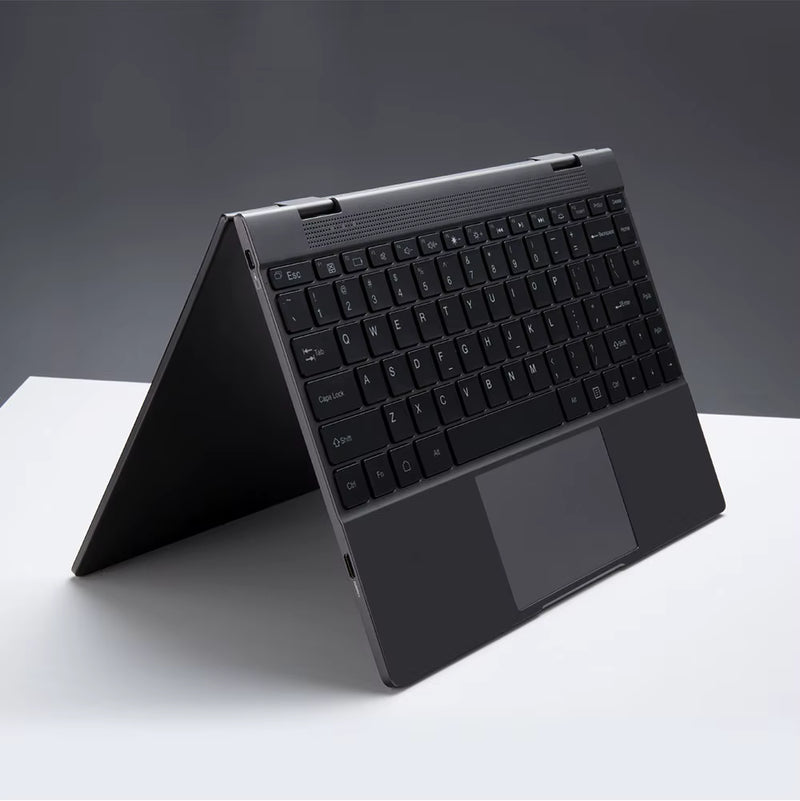
Portable by Design
From everyday work to travel, your workspace stays compact and easy to carry.
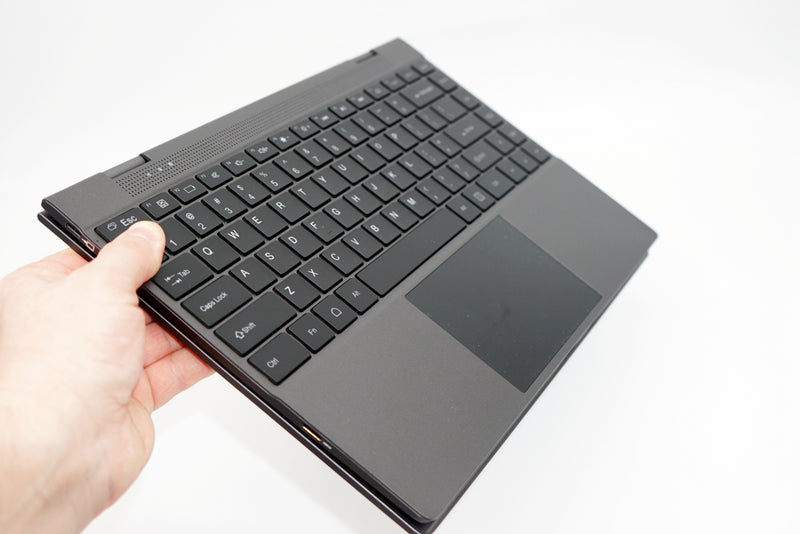
Built for Flexibility
With multiple connectivity options and compatibility across different device categories, you can adapt your setup to different situations.
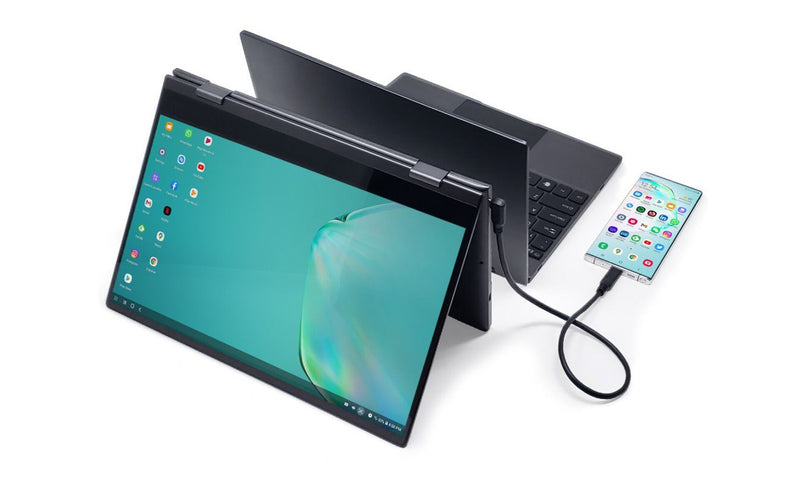
Made for More Than One Use
Work, code, browse, watch, or game from the same portable workstation.
Check Compatibility Before You Connect
Before choosing a lapdock, check three things on your device. Tip: A USB-C port does not always support video output. Check your device specifications before purchasing a USB-C lapdock.
Real-life User Case Photos


Learn More About Lapdocks
-

Lapdock Troubleshooting Guide: Drivers, Display...
Introduction: Ending Black Screens, Charging Failures, and “No Signal” Issues Lapdocks are often misunderstood as fragile or overly complex devices, but in reality most modern models are built on a...
Lapdock Troubleshooting Guide: Drivers, Display...
Introduction: Ending Black Screens, Charging Failures, and “No Signal” Issues Lapdocks are often misunderstood as fragile or overly complex devices, but in reality most modern models are built on a...
-

How to Mod and Hack the Classic Motorola Atrix ...
Introduction: A 2011 Device That Still Refuses to Die The Motorola Atrix Lapdock was originally designed for the Atrix 4G smartphone back in 2011, but in 2026 it has quietly...
How to Mod and Hack the Classic Motorola Atrix ...
Introduction: A 2011 Device That Still Refuses to Die The Motorola Atrix Lapdock was originally designed for the Atrix 4G smartphone back in 2011, but in 2026 it has quietly...
-

DIY Raspberry Pi Laptop: Using a Lapdock as a P...
Introduction: The Ultimate Geek Upcycling Project What if you could turn a tiny single-board computer into a portable Linux laptop without designing a custom case, soldering wires, or buying an...
DIY Raspberry Pi Laptop: Using a Lapdock as a P...
Introduction: The Ultimate Geek Upcycling Project What if you could turn a tiny single-board computer into a portable Linux laptop without designing a custom case, soldering wires, or buying an...


Frequently Asked Questions
What is a lapdock?
A lapdock is a portable device that combines a display, keyboard, trackpad, battery, and connectivity options while using an external device such as a smartphone or mini PC for processing power.
Can I use a lapdock with Samsung DeX?
Yes, compatible Samsung Galaxy devices that support Samsung DeX can connect to a compatible lapdock for a larger display and laptop-style controls.
What is the best lapdock for Samsung DeX?
The best lapdock for Samsung DeX typically includes USB-C connectivity, touchscreen support, long battery life, and a high-quality display for multitasking.
Is a wireless lapdock worth it?
A wireless lapdock can significantly improve convenience and mobility, especially for users who frequently use Samsung Wireless DeX or wireless display technologies.
Can I use a USB-C lapdock with a mini PC?
Yes. Most USB C lapdock models support mini PCs, handheld gaming devices, and compatible smartphones.
Can I connect a Raspberry Pi to a lapdock?
Yes, if the Raspberry Pi and lapdock support compatible video and peripheral connections. HDMI and USB-C configurations vary by model.
Can I use a Steam Deck or ROG Ally with a lapdock?
Compatible gaming handhelds can connect to a lapdock through supported USB-C or other video connections, allowing you to use a larger display and laptop-style controls.
What's the difference between a lapdock and a portable monitor?
A lapdock includes a keyboard, trackpad, battery, and additional connectivity features, while a portable monitor is primarily a display-only solution.
Collapsible row
Are 4K lapdocks and OLED lapdocks better?
For users who prioritize image quality, a 4K lapdock or OLED lapdock can provide a noticeably improved visual experience for both work and entertainment.
How does a lapdock work?
Connect a compatible device such as a smartphone, mini PC, Raspberry Pi, or gaming handheld. The connected device provides the processing power, while the lapdock provides the laptop-style interface.
Does every USB-C port support video output?
No. USB-C describes the connector, not necessarily all of its capabilities. Your device needs to support a compatible video-output standard for USB-C display connectivity.
Can a lapdock replace a laptop?
A lapdock can replace some laptop use cases when paired with a capable device such as a smartphone, mini PC, or gaming handheld. However, the experience depends on the computing power, operating system, and capabilities of the connected device.